

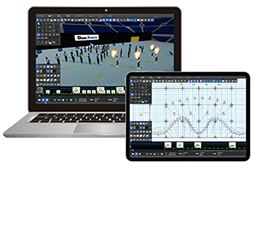
“Drill Studio is a marching band formation design software developed in Japan.”
Edit on the spot, share immediately. Accelerate your marching band’s evolution with Drill Studio.
- Cross‑platform support – edit anywhere
- Intuitive tools to bring your vision to life
- Realistic 3D simulation from actual viewing angles
- Lighting simulation capabilities
- Full audio synchronization, auto‑calculate counts
- Drill sheet printing, video export, PDF output
- Server upload for instant sharing
- Companion app for playback and positions
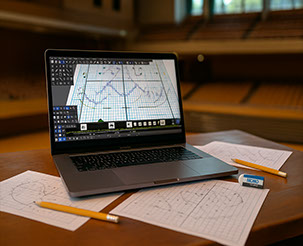
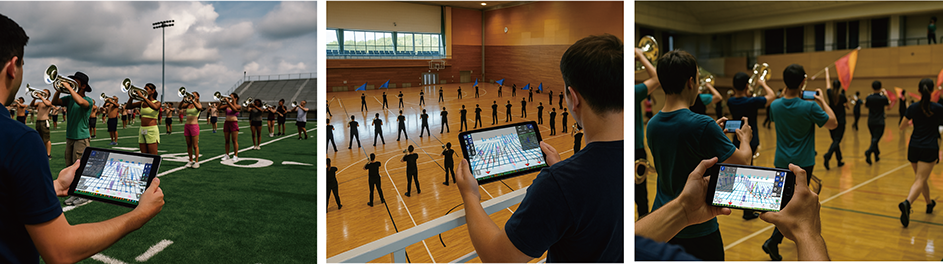
Realism meets creativity.
An evolution in formation design—driven by intuitive UX and rich features.
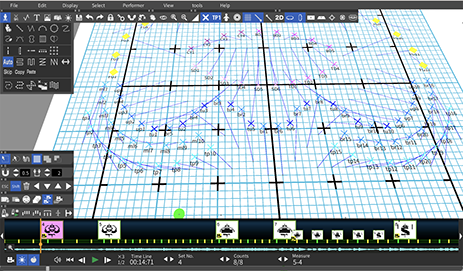

Form freely. Count smart.
Measures in, counts out—automatically.
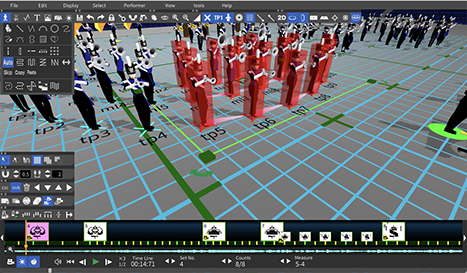
DrillStudio’s 3D view isn’t just for preview—
it’s fully editable in real time.
Any stage. Any prop. Any light.
Every detail, fully recreated.
From clean lines and perfect circles to complex curves—draw any shape with precision.
Special moves like pinwheel and follow-the-leader are just as easy to create.
Design custom drill sheets with ease—counts, sheet numbers, and annotations are auto‑tagged for accuracy and speed.
Preview from any angle—and edit right from the 3D view.
Visualize how your drill will actually look from the audience’s perspective, and fine-tune every move with powerful, purpose-built tools.
Design with impact. Create with precision.
Preview from any angle—edit directly in 3D.
See your drill as the audience will, and fine-tune your design in real time.
Packed with powerful features to help you create more impactful, effective formations.
●Get started with confidence—backed by full tutorials and manuals.
Drill Studio is built for everyone—even first-time users can start with confidence.
- A comprehensive 70-page PDF manual covering all features
- 25+ step-by-step tutorial videos, each around 10 minutes
- Friendly support via LINE, WhatsApp, and more
Online PDF Manual
https://aucs-jp.com/en/manual_en_6.pdf
YouTube Tutorial Series
https://www.youtube.com/playlist?list=PLg0pz8dhkbVE_zU7O_au09TqXdDzMAS4G
●Quick support through SNS chat-based user assistance, even in times of trouble





Drill Studio Download
The download is free of charge. (with limited functionality)
The download is free, although features such as saving and printing are limited.
A subscription is required to access all features.
Mobile app stores (iPad & Android)


Supported Devices
- iPads running iPadOS 15 or later
- Tablet devices running Android 8 or later
Payment Methods
- Apple ID (in-app purchase)
- Google Account (in-app purchase)
Available Plans
- Monthly Plan (subscription)
- Annual Plan (subscription)
Web Download (Win/Mac)
Supported Devices
- Windows 10/11 or later
- macOS Big Sur 11.0 or later
Payment Methods
- Pay using the button below
PayPal, or bank transfer)
Available Plans
- Monthly Plan (subscription)
- Annual Plan (subscription)
- Package Plan (3-year supp.)
Mac App Store
(MacOS)

Supported Devices
- macOS Big Sur 11.0 or later
(Intel / Apple Silicon)
Payment Methods
- Apple ID (アプリ内課金)
Available Plans
- Monthly Plan (subscription)
- Annual Plan (subscription)
Plans and Pricing
Monthly Plan
$20.0 /Monthly
Ideal for short-term use or trying it out
- Monthly subscription
- Subscribe only when you need it
- Pay with PayPal
- Usable on two devices (*2)
Yearly Plan
$98.0 /Yearly
Ideal for professional
drill designers
- Annual subscription
- Better value than monthly payment
- Pay with PayPal
- Usable on two devices (*2)
*1 For bank transfers, the contract is on a yearly basis. Renewal requires a new payment procedure.
*2 Usage is limited to computers or tablets owned by the user. Use on someone else's device is not permitted.
*3 You may register two devices with perpetual offline activation for organizational use, plus two additional devices for online use within the 3-year support period, available to members.
- The prices shown above apply to users who purchase from the website.
- If downloaded from an app store, a subscription will be required via in-app purchase.
- Prices may differ from those listed above due to pricing standards set by each app store.
- All prices include tax. Prices are subject to change without notice.

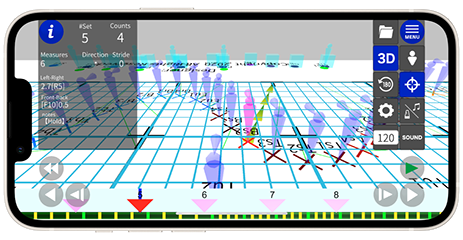
This is an app that allows you to play Drill Studio data on mobile devices.
It faithfully reproduces the data, enabling you to check not only the overall movements but also individual positions.
Unlike PDFs or coordinate sheets, it offers real-time playback, making it a next-generation tool for marching.
For more details, please visit the app pages on the App Store and Google Play.
Now available for free for a limited time (as of August 2025).
Perfect for pre-rehearsal preparation and visualization training!
Allows detailed checking of individual positions and the overall movement flow.
For more → About Drill Studio Viewer

Drill Studio Viewer
Frequently Asked Questions
Our staff will promptly answer any questions you may have before purchasing,
how to use the product, or about the drill design.
Please feel free to ask any questions you may have.
Contact us by e-mail
Please be sure to include "Drill Studio Inquiry" in the subject line to prevent spam.
Contact us by SNS

Other social networking services are also available, but we may not be able to respond to your inquiries. If you are in a hurry, please use e-mail, LINE, or WhatsApp.



I get a warning and cannot download or install properly.
It may be blocked by the security of your OS or browser.
Please be assured that this program does not contain any viruses or malicious scripts.
For instructions on how to download and install the program, please see "If you receive a warning".I would like to put it on both my Mac and Windows computers, is this possible?
It is possible to
Up to two computers owned by one user can be registered.Registration is possible regardless of whether the computer is a Mac or Windows PC.
I bought a new computer. Can I change the registered computer?
When you switch computers, you must delete the information of the old computer from the server and register the information of the new computer.
By creating a Drill Studio account, you can manage devices from the account management screen.
From the device management screen, delete the registered device information and register a new one.
If you do not know how to create an account, please contact us.I have a subscription to the PC version, do I need to purchase an additional subscription to use the tablet?
The same activation key can be used to activate a tablet as well, so you can use it without any additional activation.However, the maximum number of PCs and tablets used together is two.
If you wish to use the service on more than two tablets, you will need to sign up for an additional subscription.Suddenly I cannot activate the software. What should I do?
Authentication uses the Internet.
If you do not have a good connection, the authentication may fail and the activation may be cut off.
Please check your Internet connection and try activation again.
If you are connected to the Internet but still cannot activate, your authentication information may have changed due to an OS update, Drill Studio version upgrade, or other reason.
If this is the case, please contact us.How many performers can you place?
It is designed for up to 200 people, but the maximum limit is 1000.
Depending on the memory and GPU performance of your computer, operation may be slow with a large number of people.
Please test the operating conditions of your computer before purchasing.
Can I upload my video to YouTube or other sites?
Uploading directly from the application is not supported.
There is a function to export videos in AVI or MOV format. Once exported, please upload the videos using tools such as YouTube.
Videos exported by Drill Studio are uncompressed, so you can use video editing software to recompress them for smooth uploading.
Can I import data from other companies' drill making software?
Sorry, we do not currently support data from other companies.
I'm not sure how to use it, can I call you for more information?
Our priority for telephone support is for operating problems.
We are very sorry, but we will answer your questions via SNS or e-mail.
After that, we will provide telephone support only when our representative determines that telephone support is necessary.
I would like to cancel my subscription.
The cancellation procedure varies depending on the store you signed up with.
If you signed up through an app store, please follow the cancellation instructions for each app store.If you signed up from this site, go to your Paypal account page, view your pre-authorization payment details, and click Cancel.
Renewal dates may be a few days ahead or behind due to leap years, base time, etc. Please cancel your subscription well in advance of the renewal date.
Please note that we do not provide refunds for payments already debited due to automatic renewal.
You can check the specific timing of your contract renewal on your Paypal account page.
If you have any questions about how to cancel your subscription, please feel free to contact us.I cannot open my saved data properly. What should I do?
Due to development environment issues, Drill Studio cannot be opened by double-clicking directly on a saved file.
Please make sure to start the software and select the saved file from [File] > [Open] to open it.
You can also open a file from "Recently used files".If the file cannot be opened in spite of correct operation, the file may be corrupted.
If you can recover some of the saved information by analyzing the file in our development environment, please contact our support.Is it possible to purchase a team and use it with everyone?
Drill Studio is available for one user and two terminals.
Even in the case of group purchases, only one registered user is allowed to use the system.It is possible for another user to temporarily use a terminal owned by that user, but the account cannot be transferred.
If the designer of the organization changes, please contact us by e-mail to change the name.
Contact Us
Copyright (C) AUCS JAPAN All Rights Reserved.


